

Happy Mother’s Day, Father’s Day AND Graduation! We know we are a few weeks late, but we just couldn’t find the right gift for our BIG Network vendors – flowers die, candy spoils, and you already have jewelry. But at long last, we found the perfect present for each and every one of you…
…the gift of additional platform functionality, starting with the Partner Permissions page!!
If you are unfamiliar with the Partner Permissions page, it’s an admin-level tool used to manage retailer partner permissions requests. A retailer will send a partnership request, and your Balance to Buy admin user(s) will receive an email notification. From there, they will need to log into Balance to Buy, navigate to the Partner Permissions Page shown below, and approve or deny partnership with the retailer in request.

If your company utilizes consultant users (Balance to Buy users who only have access to a certain list/territory of partnering retailers), vendor admins will also need to give access to the applicable consultant users for any newly-approved (or previously unassigned) retailers. This process is about to get even easier, because we have added Sales Rep Assignment functionality right to the Partner Permissions Page! That’s right, it will be a one stop shop for vendor admins to both approve retailers in request and grant the appropriate consultant user(s) access to their data!
But wait… there’s more!
Also new to the Partner Permissions Page AND new to Balance to Buy in general, we are proud to roll out Territory Assignment functionality!
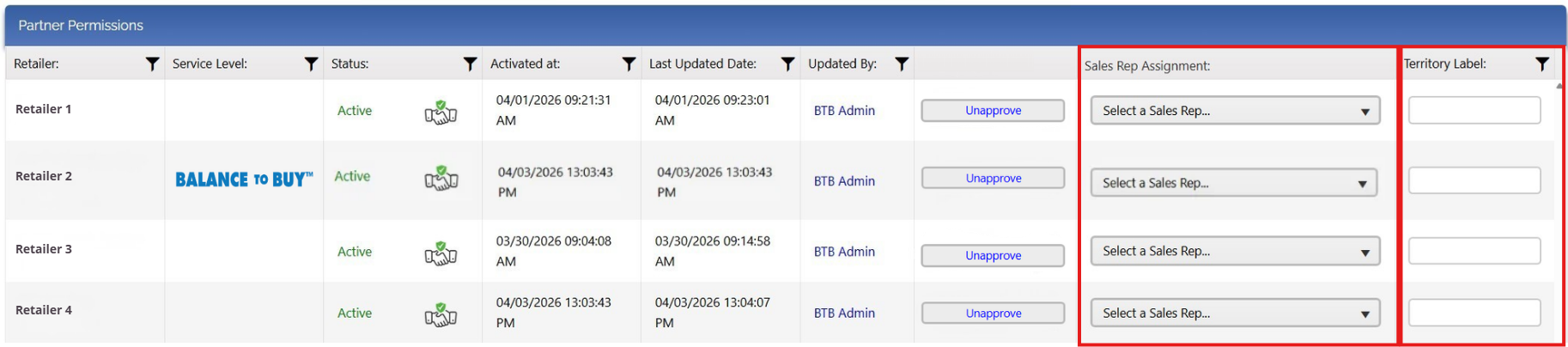
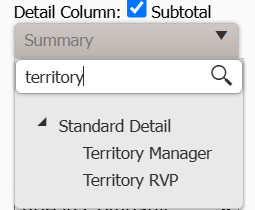
What does that mean? Vendors can add Territory Labels to each retailer right from the Partner Permissions Page, and both Sales Rep and Territory Label can be used as a data point in the Detail Column of any report! Simply type to search Territory Manager to populate Sales Rep names and Territory RVP to populate Territory Labels into any and all Vendor Version Sum-Det Reports.
We know, we know – this is a LOT of info that opens up even more possibilities for analysis – if you have any questions or concerns, please don’t hesitate to reach out to any member of The BIG Network team below (or all of us at venteam@bigjewelers.com).
We might have missed a lot of Spring & Summer celebrations, but we promise we’ll make it up to you between now and the next BIG holiday!